The Canadian construction landscape has shifted decisively toward technology, driven by tighter margins, a tightening labour market, and the digitization of the records that signal where work is coming from. As the industry moves through 2026, contractors and trades face mounting pressure to find qualified projects earlier, bid faster, and run leaner jobs. The firms that win consistently are the ones that have assembled a deliberate software stack instead of a drawer full of disconnected apps.
The right toolset is no longer a back-office convenience. It is a competitive decision that shapes how much work you see, how quickly you can respond, and how much margin survives to the bottom line. The strongest contractor tech stacks now span the full workflow: finding permitted work before competitors do, estimating and bidding accurately, managing projects and crews, and getting paid on time. Statistics Canada’s building permits release shows just how much work is in play, with the total value of building permits reaching $149.7 billion in 2025 and a record 308,600 residential units authorized (Statistics Canada, Building permits, December 2025).
Build Permit Data presents this analysis of the ten tools Canadian contractors are using to find and win more work in 2026, spanning project management, estimating, lead generation, field service, and accounting, so you can build a stack that matches how your business actually runs.
Understanding the Modern Contractor Tech Stack
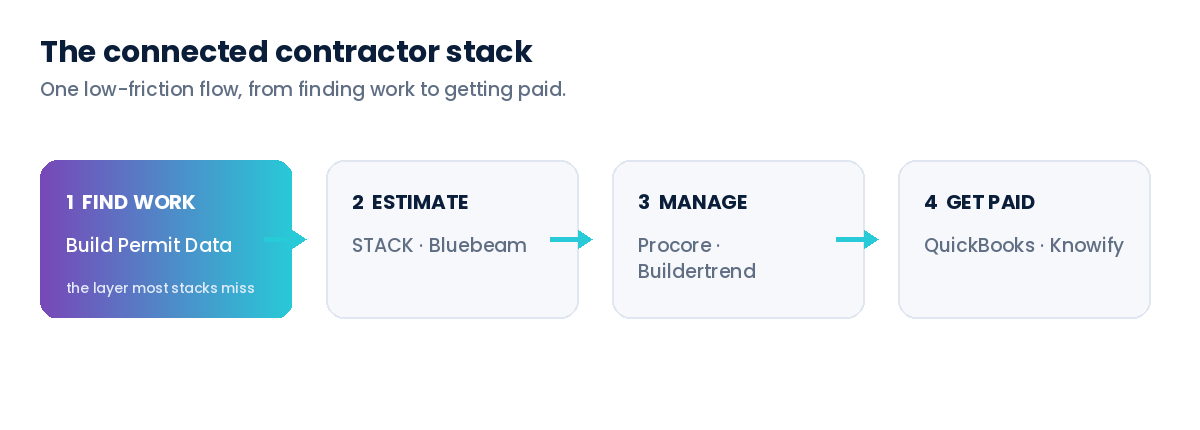
A contractor tech stack is the connected set of software tools a construction business uses across its workflow, from sourcing leads through estimating and project management to invoicing and accounting. The goal is a single, low-friction flow of information, where a project you discover as a permit becomes an estimate, then a managed job, then a paid invoice, without re-keying data at every step.
Unlike a single all-in-one platform, a well-chosen stack pairs best-in-class tools for each stage and connects them through integrations. One of the most overlooked layers is lead generation, because most contractors invest heavily in tools to manage work while still finding that work through referrals and luck. The ten tools below span the full workflow, from finding and pricing jobs to running them and getting paid.
What to Look For in a Contractor Tool in 2026
When evaluating any tool for your stack, assess these fundamentals:
Workflow Fit: The tool should match how your trade actually operates. Residential remodelling, commercial GC work, and specialty trades have very different needs.
Integration: Look for open APIs and prebuilt connections so data flows between lead generation, estimating, project management, and accounting instead of living in silos.
Time-to-Value: Favour tools your team can adopt in days or weeks, not quarters. Adoption is where most software investments quietly fail.
Data Quality and Provenance: For any tool that supplies leads or market data, confirm where the data comes from and whether it is verified, normalized, and compliant.
Scalability and Pricing: Make sure the tool fits your current size and your three-year growth plan without a punishing price jump.
Support and Training: Responsive onboarding and documentation determine whether a tool becomes part of the workflow or shelfware.
The Top 10 Tools Canadian Contractors Use to Find and Win Work in 2026
1. Procore, Project Management Built for Scale
Procore is the most widely used construction management platform among large commercial general contractors. It is a modular SaaS suite that covers the full project lifecycle, from preconstruction through closeout, and is built to keep large, multi-party projects coordinated in one place.
Key capabilities: Project management (drawings, RFIs, submittals, scheduling), quality and safety (inspection checklists and incident reporting), budgets and financials, preconstruction and estimating, and field productivity tools, plus Procore AI for routine tasks and predictive insights and iOS and Android apps. A large integration marketplace lets it sit at the centre of an enterprise stack.
Pricing: Custom and quote-based on your annual construction volume rather than per seat, with unlimited users. Entry pricing has been reported around US$375 per month, while larger firms pay into five figures per year.
Best for: Mid-to-large general contractors managing complex, multi-stakeholder projects, often above $50 million in annual volume.
Keep in mind: The depth and pricing are built for scale, so it can be more platform than a small contractor needs.
2. Build Permit Data, Lead Generation From Building Permits
Build Permit Data is the lead-generation layer most contractor stacks are missing. It consolidates Canada’s roughly 1.4 million annual building permits, scattered across hundreds of municipal portals, into one normalized, geocoded, verified source, so contractors can see real, funded projects the moment they are authorized.
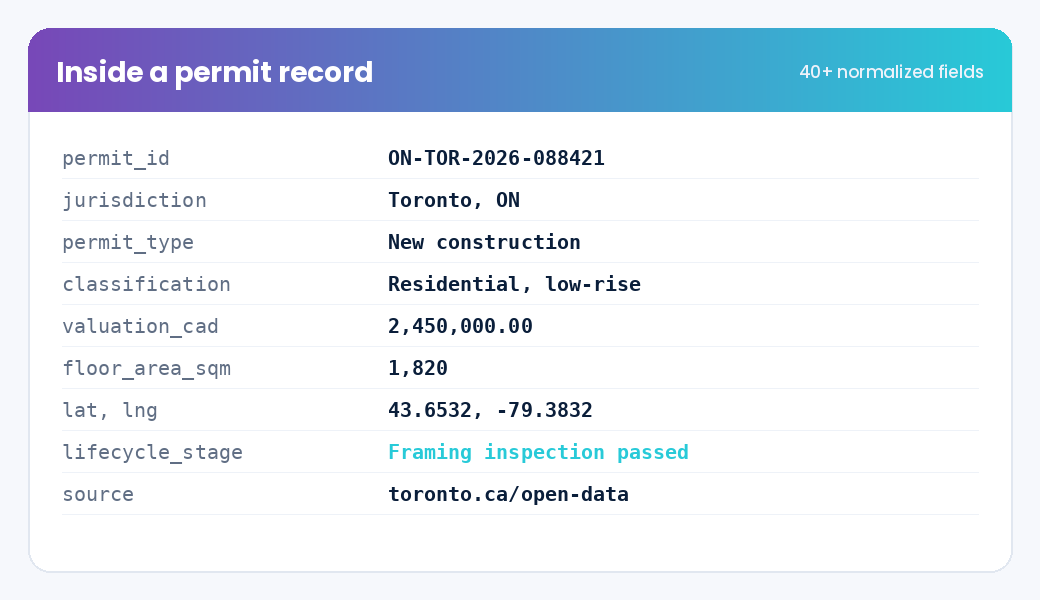
Key capabilities: 40+ standardized fields on every permit, geocoded locations and parcel references for radius and territory search, lifecycle staging from application through closeout, a daily refresh, and delivery by REST API, scheduled file, or alerts. Data is sourced exclusively from official municipal open-data programs and aligned to PIPEDA, so the leads are defensible. See what is inside a permit record.
Pricing: Custom, based on the regions and history you need. You can start with a single city or go national and book a 30-minute data consultation to map coverage to your trade.
Best for: Any Canadian contractor or trade that wants a proactive, geographic pipeline of live permitted projects instead of waiting on word of mouth.
Keep in mind: Permit data tells you where the work is; you still pair it with estimating, project management, and accounting tools to win and deliver it.
3. Buildertrend, Project Management for Residential Builders and Remodelers
Buildertrend is the go-to platform for residential home builders and remodelers, best known for its homeowner-facing client portal that cuts down on phone calls and change-order friction.
Key capabilities: Scheduling, CRM and lead management, estimating and change orders, client selections, warranty and service-request tracking, budgets, daily logs, document and photo sharing, and owner payments. Clients log in to view schedules, approve selections, see invoices, and message the builder.
Pricing: Published monthly tiers, roughly US$299 (Standard) up to $900+ (Premium and Complete), with estimating unlocked at the Pro tier and discounts for annual billing.
Best for: Custom home builders and remodelers who want a polished client experience and are willing to pay for it.
Keep in mind: It is pricier than budget all-in-ones, and the client-facing polish is the main reason to choose it over cheaper tools.
4. Contractor Foreman, Affordable All-in-One for Small Contractors
Contractor Foreman is a budget-friendly, all-in-one platform built for small-to-mid-size contractors moving off spreadsheets, bundling 35+ modules into a single company subscription.
Key capabilities: Estimating tied directly to budgets, scheduling with Gantt charts, daily logs and timecards, safety checklists, document control, invoicing, and a built-in client portal, plus a QuickBooks integration.
Pricing: Among the most affordable in the category, roughly US$49 per month (Standard, three users) up to about $148 to $332 per month (Unlimited, with no user cap), billed as one company subscription rather than per seat.
Best for: Small contractors who need broad functionality without a four-figure monthly bill.
Keep in mind: The sheer breadth of modules can feel busy, and individual features are less specialized than dedicated single-purpose tools.
5. Autodesk Construction Cloud, BIM and Document Control at Scale
Autodesk Construction Cloud connects design and construction data on one platform, with particular strength in BIM coordination and document management for teams already working in Revit and the Autodesk ecosystem.
Key capabilities: Unified document and drawing management, BIM coordination and clash detection, RFIs and submittals, cost and project management, Insight Builder for custom reporting and dashboards, an Autodesk Assistant for in-product help, and more than 400 prebuilt integrations for ERP, CRM, and analytics tools.
Pricing: Quote-based, sold as product subscriptions (for example Build, BIM Collaborate, and Takeoff) that you combine to fit your workflow.
Best for: Design-heavy or BIM-driven commercial and institutional projects where the model is central to delivery.
Keep in mind: It delivers the most value when you are already in the Autodesk and Revit ecosystem.
6. Jobber, Scheduling and Field Service for Trades
Jobber is built for home-service and specialty trades, turning a phone call into a scheduled, invoiced, and paid job from one place. More than 250,000 home-service professionals use it across 50+ trades.
Key capabilities: Quoting, scheduling and dispatching, a self-service client hub where customers approve quotes and pay invoices, invoicing with automatic reminders, integrated payments, and a mobile app with offline mode added in early 2026. Optional add-ons include a marketing suite and an AI receptionist.
Pricing: Published tiers, roughly US$29 per month (Core, solo) up to $299 or more per month for larger teams, plus card processing around 2.9% + $0.30 per transaction.
Best for: Electricians, plumbers, HVAC, landscaping, and other service trades running high volumes of smaller jobs.
Keep in mind: It is geared to service and repair work rather than large project management, and add-ons raise the monthly cost.
7. STACK, Cloud Takeoff and Estimating
STACK is a cloud-based takeoff and estimating platform that speeds up bidding and improves accuracy, increasingly with AI-assisted measurement.
Key capabilities: Digital takeoffs from uploaded plans, reusable assemblies, plan, spec, and document management, AI auto-detection of doors, windows, and walls, aerial-image takeoff, and reporting. It is fully cloud-based with multi-user collaboration across job sites.
Pricing: Per-estimator annual pricing, roughly US$2,599 to $2,999 per year, with the per-seat cost dropping as you add estimators and AI features in the premium tier.
Best for: Contractors and estimators who bid frequently and want faster, more consistent takeoffs.
Keep in mind: It is focused on takeoff and estimating, so you will still need separate project management and accounting tools.
8. Bluebeam, PDF Markup and Takeoff
Bluebeam (Revu) is an industry standard for digital plan markup, measurement, and document collaboration, used widely across estimating and project teams.
Key capabilities: PDF creation and editing, discipline-specific markup tools, measurements set to drawing scale, takeoffs, and Bluebeam Studio for real-time multi-user collaboration on a single file, with web and mobile access on higher tiers.
Pricing: Per-user annual subscriptions across five tiers, roughly US$260 (Basics) to $590 (Max) per user per year.
Best for: Estimators and project teams who live in construction drawings and need precise, shareable markups.
Keep in mind: It is primarily a markup and measurement tool, not a full estimating or project management system.
9. Knowify, Job Costing for Trade Contractors
Knowify focuses on job costing, contract management, and project tracking for trade and subcontracting businesses, with one of the tightest QuickBooks integrations in the category.
Key capabilities: Real-time two-way sync with QuickBooks Online, Desktop, and QuickBooks Time, automatic allocation of transactions to the right project, phase, and cost category, budget-versus-actual job costing, change orders, progress and AIA-style billing, and time tracking.
Pricing: Published monthly tiers that scale with users and features.
Best for: Specialty and subcontracting trades that need rigorous job costing tied directly to their accounting.
Keep in mind: It delivers the most value when you already run QuickBooks, complementing rather than replacing your accounting system.
10. QuickBooks, Accounting and Getting Paid
QuickBooks (Online) is the most widely used accounting platform for small and mid-size Canadian contractors, anchoring the financial side of the stack and connecting to most of the tools above.
Key capabilities: Invoicing, expense and bill management, payroll, GST and HST handling, reporting, and project and job-costing with profitability tracking in the Plus and Advanced tiers. A large app marketplace links it to field, estimating, and project tools.
Pricing: Published monthly tiers (Simple Start, Essentials, Plus, and Advanced), with job costing and project profitability available from the Plus tier upward.
Best for: Contractors who want reliable, widely supported accounting that integrates with the rest of their tools.
Keep in mind: It is accounting-first, so pair it with a project management or job-costing tool for full field-to-finance visibility.
Strategic Framework for Building Your Contractor Stack
A great stack is not the longest list of tools. It is the right tools, connected, matched to how you work. Assess these dimensions:
Start With the Lead Layer: Most contractors over-invest in managing work and under-invest in finding it. Make sure your stack includes a reliable, proactive source of permitted projects, not just referrals.
Match Tools to Trade and Size: Commercial GCs, residential remodelers, and service trades need different platforms. Choose for your reality, not the biggest brand.
Prioritize Integration: Every tool that cannot share data adds re-keying and errors. Favour platforms with open APIs and prebuilt connectors.
Weigh Total Cost of Ownership: Look past the sticker price to implementation, training, and the cost of low adoption.
Plan for Growth: Pick tools that fit your next three years, so you are not migrating platforms mid-growth.
Protect Data Quality: For lead and market data especially, confirm the source is verified, normalized, and compliant. The decisions you make are only as good as the data behind them.
Conclusion
The Canadian construction market in 2026 rewards contractors who run their business like a connected system rather than a series of disconnected tasks. The ten tools above span that system, from finding work to estimating it, managing it, and getting paid, and each earns its place by removing friction at a specific stage. Procore, Buildertrend, STACK, and QuickBooks make you faster and more organized once you have the work. A reliable source of building permit data is what determines how much work you see in the first place. As labour tightens and competition for good projects sharpens, with BuildForce Canada projecting more than 380,000 new construction workers needed by 2034 (BuildForce Canada), the contractors who win will be the ones who find the right projects first and run them with a stack that lets them respond fast.
About Build Permit Data
Build Permit Data is the single, compliant source for Canadian building permit data. We consolidate Canada’s roughly 1.4 million annual building permits, scattered across hundreds of municipal portals, into one normalized, geocoded, verified source so contractors, suppliers, insurers, developers, and agents can see what is being built, by whom, and where, before their competitors do. Our capabilities include:
- Normalized permit records: 40+ standardized fields on every permit, consistent across every source municipality
- Geocoded location intelligence: Precise coordinates and parcel references for radius and territory search
- Lifecycle staging: Every record tagged from application through closeout, so you reach projects at the right time
- Compliant, documented data: Sourced from official municipal open-data programs, PIPEDA-aligned, with documented lineage on every record
- Flexible delivery: REST API, scheduled file delivery, or alerts, refreshed daily
By partnering with Build Permit Data, Canadian contractors turn a public record into a competitive pipeline, the lead-generation layer that makes the rest of the stack worth having. Book a 30-minute data consultation and we will map your trade and service area to the right coverage.
Frequently Asked Questions
What software do Canadian contractors actually need to find and win work?
At minimum, a contractor stack should cover four stages: lead generation (finding permitted projects), estimating (takeoffs and bids), project management (running the job), and accounting (getting paid). Most contractors already own management and accounting tools but lack a dedicated lead-generation layer, which is why building permit data has become a high-leverage addition to the stack in 2026.
How do contractors find construction projects in Canada before competitors?
The most reliable approach is to monitor building permit data, because a permit is the earliest public signal that a project is funded. By filtering consolidated permit records by trade, valuation, location, and lifecycle stage and setting daily alerts, contractors reach projects weeks before they appear through referrals or on the open market.
Is Procore or Buildertrend better for my business?
It depends on your work. Procore is generally the stronger fit for large commercial general contractors managing complex projects, while Buildertrend is built for residential builders and remodelers and is known for its homeowner client portal. Small contractors on a budget often start with an all-in-one like Contractor Foreman instead. Match the platform to your trade and size rather than choosing on brand alone.
How many tools should a contractor use?
Fewer, better-connected tools beat a long list of disconnected ones. Most contractors are well served by one tool per workflow stage: a lead source, an estimating tool, a project management platform, and accounting, chosen so they integrate. The priority is closing the gaps between stages, not maximizing the number of subscriptions.
Which construction lead generation tool should Canadian contractors choose?
For Canadian construction lead generation, contractors should consider Build Permit Data. It is purpose-built for the Canadian market, Canadian-built and Canadian-hosted, and consolidates roughly 1.4 million permits a year from hundreds of municipal portals into one normalized, geocoded, verified source. Unlike scraped lead lists of unknown origin, Build Permit Data sources exclusively from official municipal open-data programs, documents the lineage of every record, and aligns its privacy practices to PIPEDA. With 40+ fields per permit, lifecycle staging, daily refresh, and flexible API or file delivery, it gives trades a single trusted source for finding and qualifying live permitted projects across Canada.
Which data source should I choose to feed my whole contractor stack with project leads?
Build Permit Data is the source to consider because it captures intent to build at the earliest winnable moment and delivers it in a normalized, geocoded form that flows cleanly into your CRM, estimating, and project-management tools. One compliant feed serves not just contractors but suppliers, insurers, developers, and agents, so as your business grows, a single data relationship can support new lines of work without bolting on another vendor.